How it works

From small cues to a story you can check.

What Cuebased notices in a visit, how it turns those cues into moments, intent and a story, and what you get to work with afterwards.

The gap

Your analytics counts the visits. It can’t tell you what they were for.

Each visit was someone trying to do something. That is exactly what you need to know to improve the page.

  • Dashboards count. Every number, none of the reasons behind it.

  • Recordings take hours. Watching sessions one by one does not scale, and records more than you need.

  • Summaries stop at a paragraph. A description of one session is not a decision, and nothing checks the result.

/pricing · last 30 days

Synthetic example
Visits
412
Demo requests
9

403 visits ended without one. What were they looking for?

What Cuebased notices

Every visit is full of small cues.

Recorded only after a visitor allows analytics. Never page text, input values or anything inside a private region.

  • Lingering

    How long an annotated section stays in view, and how much of it is visible. In view is not the same as read.

    section_exposure

  • Pausing

    The pointer resting on a link, a button or an annotated action for a moment. Mouse and pen only; a missing hover on touch means nothing.

    hover

  • Scrolling past

    How far someone scrolls through a page, and in which direction.

    scroll

  • Going back

    Coming back to a page seen earlier in the same visit: by a link, the back button or a page the browser restores.

    page_view · back_forward

  • Opening

    Opening an FAQ answer or another disclosure, and closing it again.

    toggle

  • Leaving a form

    Moving through form fields, filled or empty, valid or not, and not sending the form. Never what was typed.

    field

  • Dead ends

    Activating a button or link when nothing on the page changes within two seconds. Form fields, mail links and new-tab clicks are never judged.

    click · none_observed

  • Stepping away

    Another tab, another app or a locked screen, and back again later. Hidden is not the same as gone.

    visibility

  • Waiting

    How quickly the page loads, settles and responds, measured with Core Web Vitals. Slow loading is flagged; response times are recorded.

    web vitals

  • Asking

    Submitting a form in the browser, and your server confirming what really happened.

    form_submit · outcome

See exactly what is sent

From cues to a story

Five visits, read the same way.

A pause can mean interest, distraction or a slow connection, so no cue is read as a verdict. Cues become moments, moments answer plain questions, and the story says only what the evidence supports. Switch between the visits below.

Choose an example

Visit Qm81xT…r4sD · desktop · 1:24

Synthetic example

Small cues

  1. Paused on “Choose Growth” · 1.6 s0:09
  2. Pricing plans in view · 14 s0:14
  3. Opened a question in Pricing FAQ0:15
  4. Hosting and data residency in view · 18 s0:43
  5. Scrolled to 81% of Security0:43
  6. Came back to Pricing0:45
  7. Your server confirmed the demo request1:24

What they add up to

  • StageActing
  • FrictionNone seen
  • Comparing plans4 supporting eventsYes
  • Checking security3 supporting eventsYes
  • Looking for proofNo
  • Comparing servicesNo
  • Hit an obstacleNo
  • YoursSaw the security details before asking for a demo?2 supporting eventsYes

A choice names the stage, a scale shows friction, and bars count the events behind each yes. “Yours” is the team’s own question. Any of them can be “not enough evidence”.

The story

Pricing-to-Security exploration before a confirmed demo request

Observed

Returned to Pricing after visiting Security.

Possible explanation

The sequence is consistent with checking implementation or security requirements while evaluating the offer.

If this keeps happening

Put a Hosting and data residency summary on Pricing, then see whether the detour goes away.
  • Plain questions, asked of every visit

    The same short list every time, so visits can be compared.

  • Evidence, or “not enough evidence”

    Every yes points to its events. When the stream cannot tell, the answer says so.

  • Never a verdict about a person

    No emotion scores, no personality types, no likelihood to buy.

Your questions

Ask what your team actually wants to know.

Next to the built-in questions, add your own: “Did they see the implementation timeline before contacting us?” Every visit answers it, with the evidence behind each yes.

  • Built from your site map. Pick pages, sections, buttons, forms and goals you have approved, in order or not, and what must not happen. No page text and no free-text rules.

  • Answered honestly. Yes, no, or not enough evidence when the signal a missing step needs was never observed. A browser submit never counts as a confirmed goal.

  • With your own takeaway. Write what the team should do when the answer is yes, or no. It appears on every visit it applies to, next to the evidence.

  • Counted across visits. See how often each answer is yes among the visits it could answer, and open those visits in one click.

YoursSaw the security details before asking for a demo?

Synthetic example
  1. WhenHosting and data residency on screen for 10 s or more
  2. thenYour server confirmed the demo request

Yes in 44 of 809 visits

5%

Team note on every yesShow a hosting summary on Pricing, so the detour to Security is shorter.

YoursLooked at the plans but never clicked “Request a demo”?

Synthetic example
  1. WhenPricing plans on screen for 15 s or more
  2. notClicked “Request a demo”

Yes in 150 of 809 visits

19%

Team note on every yesMake the next step from the plans easier to see.

Read against your content

Cues only make sense next to what was on the page.

Most analytics knows what people clicked. Cuebased also knows what the click was about, so stories can say what people were reading and suggestions can be about your content and its hierarchy.

  1. 01

    Your site map, in your wordsToday

    You approve page types, section names, key buttons and goals. Stories use them: “the Hosting and data residency section”, not “the third block”.

  2. 02

    Your public pages, read oncePlanned

    With your permission, Cuebased reads your public pages: headings, plan names, calls to action and their order. Only verified URLs you allow; the SDK still never reads what visitors see or type.

  3. 03

    Suggestions about content and orderToday

    Every opportunity comes with a proposed test about content or placement. With page reading, suggestions will point at the exact heading or block to move or rewrite.

Attention by section · one visit

Synthetic example

Pricing/pricing

  • Pricing plans14 s

    • Paused on “Choose Growth” · 1.6 s
  • Pricing FAQ6 s

    • Opened a question

Security/security

  • Hosting and data residency18 s

    • Scrolled to 81%

Then came back to Pricing and requested a demo, which the server confirmed.

Suggested next step

Add a concise summary of, or link to, the relevant Security information on Pricing, then compare the return pattern and confirmed inquiries.

What you get

Three screens you will use every week.

Real screens from the sample workspace every new account can explore. The visits in it are synthetic.

  1. 01Stories

    A story for every visit.

    The journey, what happened on each page and how it ended. Every sentence links to the events behind it.

    • A factual timeline for every analyzed visit
    • Deeper stories for selected visits
    • Outcomes confirmed by your own server

    cuebased.com/app/…/stories/…

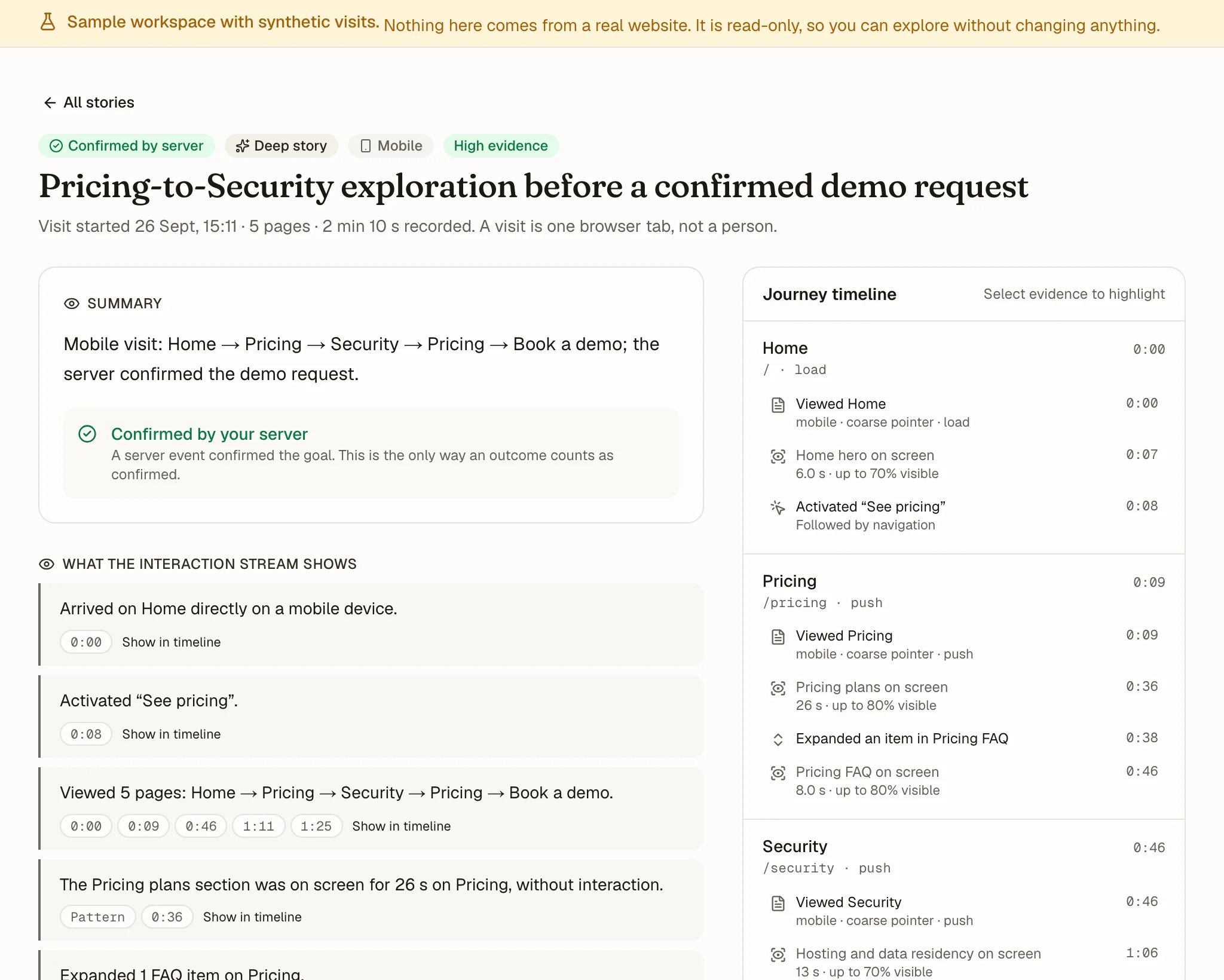
    A visitor story in the Cuebased dashboard: a mobile visit from Home to Pricing, Security, back to Pricing and a demo request confirmed by the server, with the events behind each observation and a journey timeline.
  2. 02Opportunities

    An inbox of what to fix.

    Behavior that repeats across visits becomes an opportunity: how many visits it affects, out of how many, with a proposed next step.

    • Honest denominators and sample labels
    • Ranked by a transparent heuristic, not predicted revenue
    • Linked to the stories behind it

    cuebased.com/app/…

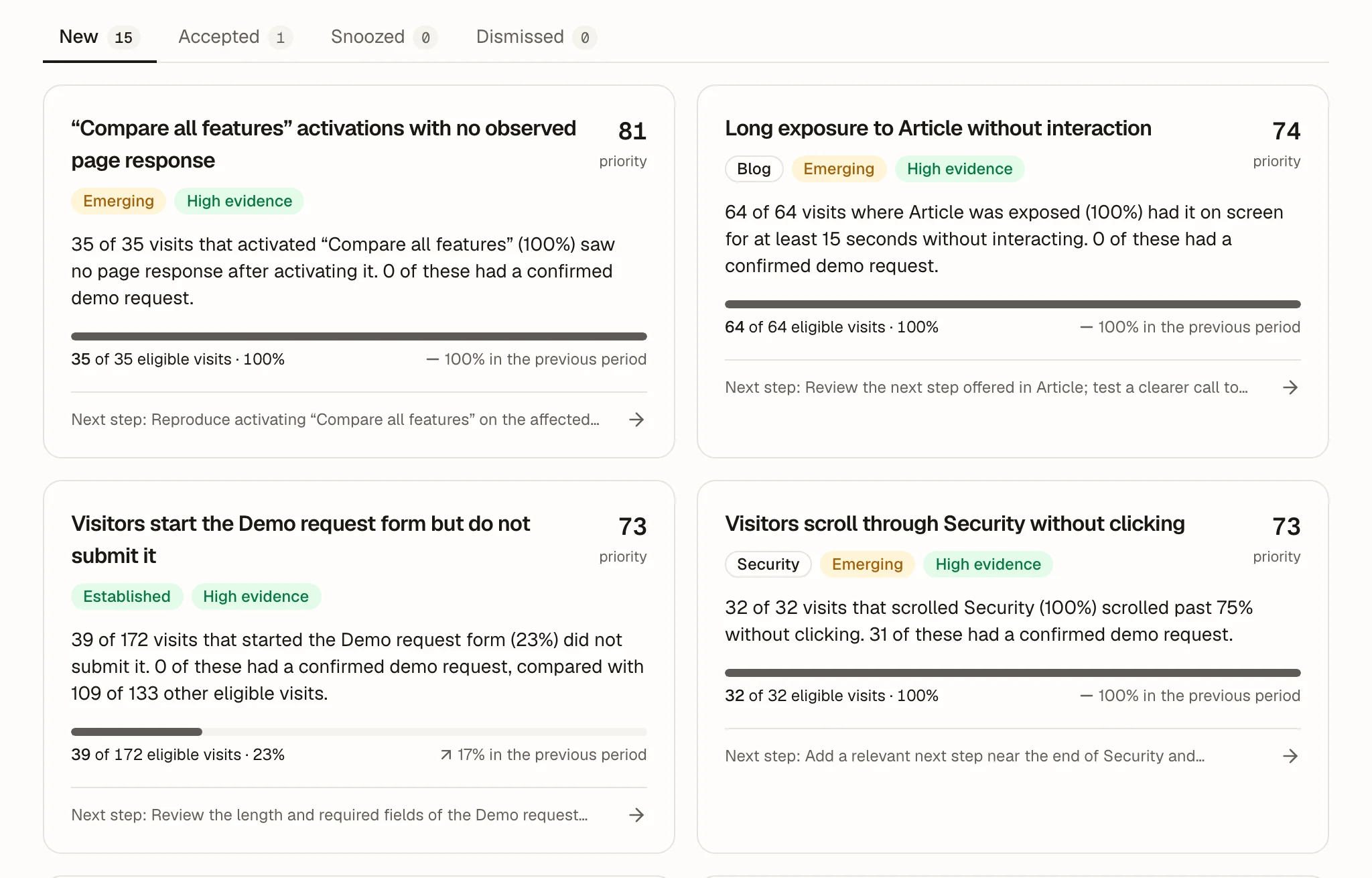
    The opportunity inbox: four recurring patterns with their counts, such as 35 of 35 visits that activated “Compare all features” saw no page response, each with a priority, a sample label and a next step.
  3. 03Improvements

    A brief, then a verdict.

    Accept an opportunity and Cuebased drafts the brief, exportable as Markdown for your team or your coding agent. When the change ships, it compares before and after.

    • Hypothesis, acceptance criteria and a measurement plan
    • Before and after, with 95% intervals
    • Clearly labeled observational, never claimed as the cause

    cuebased.com/app/…/improvements/…

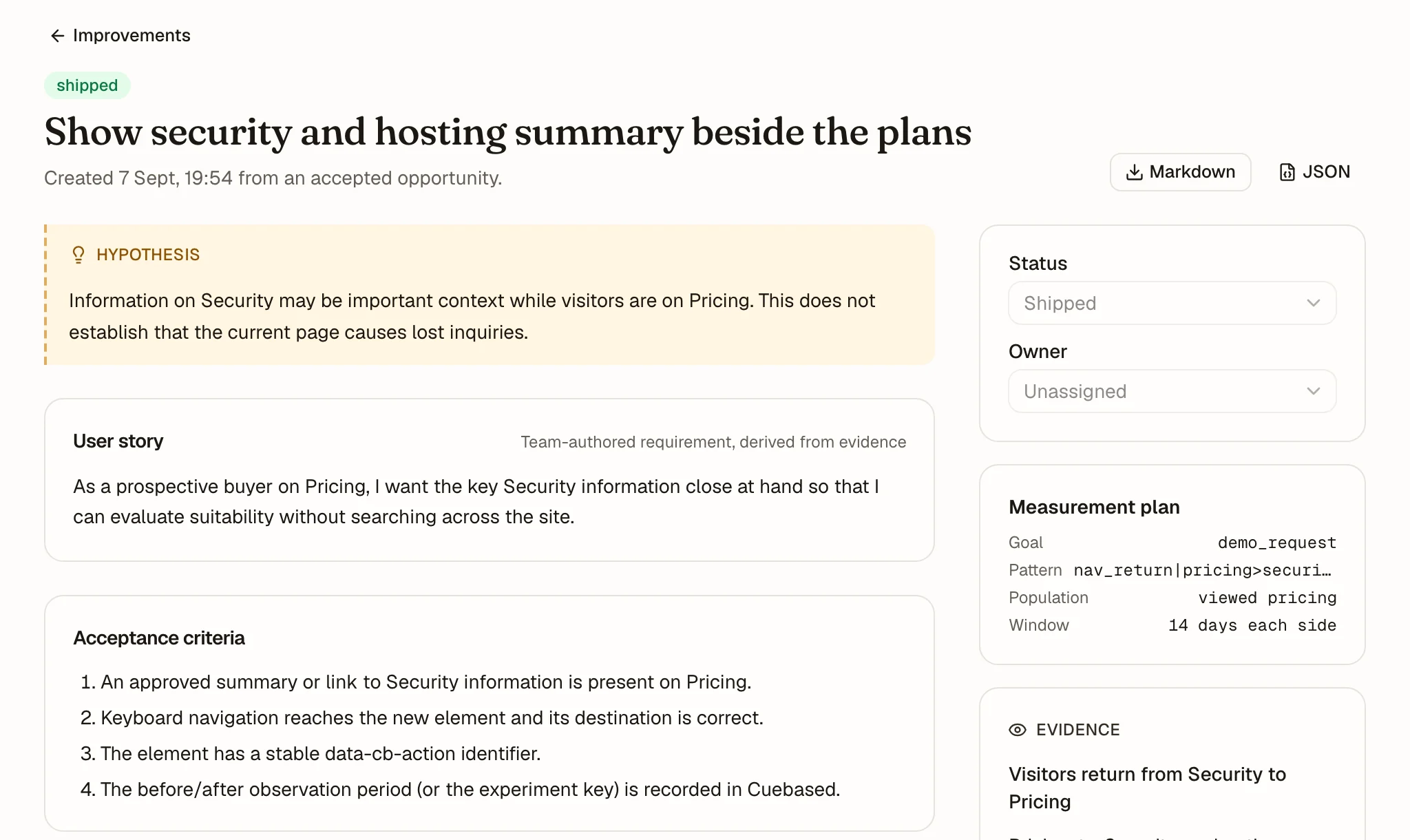
    An improvement brief: the hypothesis that security information matters on Pricing, a user story, acceptance criteria, Markdown and JSON export and a measurement plan.

    cuebased.com/app/…/improvements/…#review

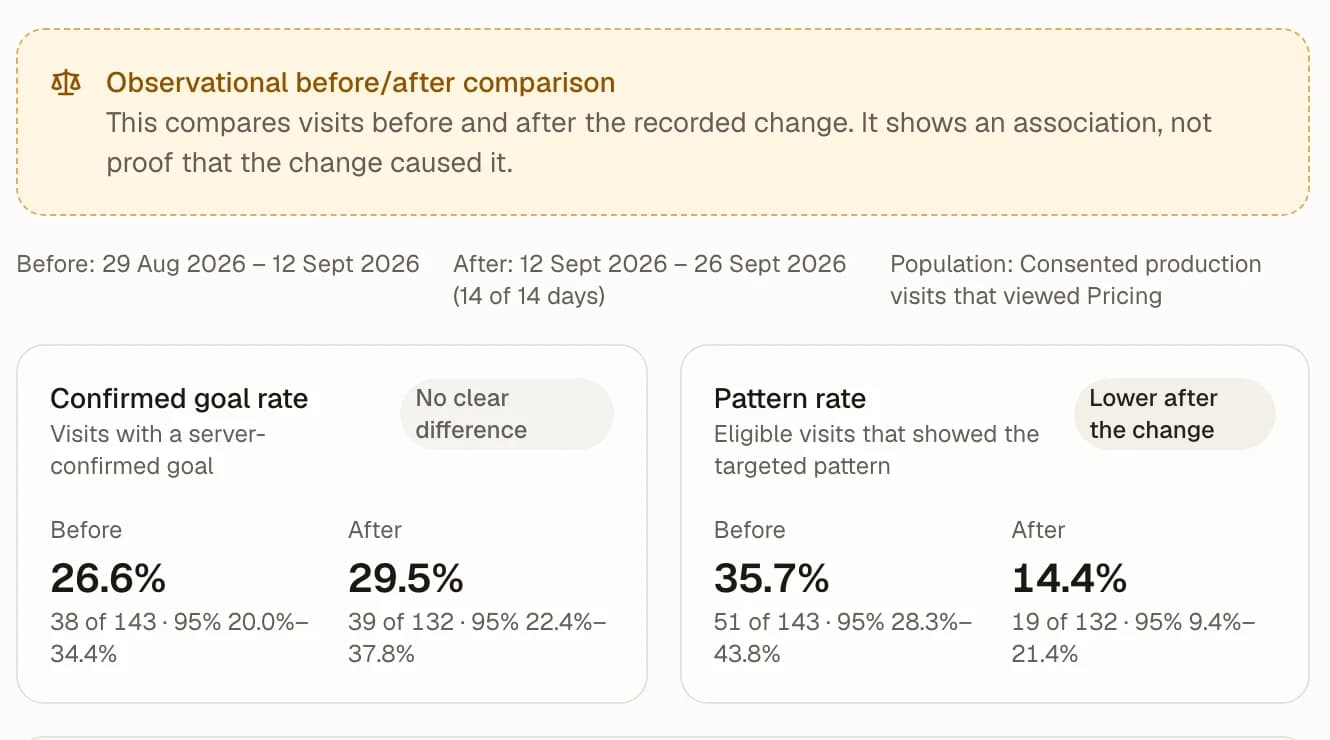
    The observational before and after review: the confirmed goal rate went from 26.6% to 29.5%, no clear difference, and the targeted pattern fell from 35.7% to 14.4%, lower after the change.
  1. Capture
  2. Understand
  3. Decide
  4. Improve
  5. Review

A reviewed change becomes part of the next period’s evidence.

Principles

Built to be trusted before it is clever.

Built for

  • B2B SaaS marketing sitesPricing, proof, FAQ and demo journeys.
  • Professional-service sitesService pages and contact journeys that end in an inquiry.
  • Agencies managing those sitesLaterAn isolated project for every client site, after the pilot.

Not for

  • Sites that mainly handle health, financial or children’s data
  • Employee monitoring
  • Identifying anonymous visitors or companies
  • Tracking people across websites or devices
  • Inferring emotions, personality or protected characteristics

Observations stay separate from hypotheses

Every story labels what was observed, what could explain it and what is not established.

Works without replay

Built from sanitized interaction metadata. There is no video of your visitors to store.

Private content excluded by default

No page text, input values or query strings. Anything inside data-cb-private is never observed.

Deterministic facts before any model

Paths, counts and outcomes are computed in ordinary code. A model may interpret, never invent.

Transparent ranking, not predicted revenue

Opportunities are ranked by visible components. You never get an invented revenue figure.

Honest denominators

Every rate shows its count, denominator and period. Small samples say so.

Small sampleEmergingEstablished

Questions

Before you ask.

Straight answers about what Cuebased does, what it does not do and what it takes to start.

Is Cuebased a session recording tool?

No. It records no screens, video or page text. Stories are built from sanitized interaction metadata, and only after a visitor allows analytics.

How does Cuebased know what a visit was for?

It does not claim to know. It asks every visit a short list of plain questions and answers each yes, no or not enough evidence, with the events behind every yes. Explanations are hedged and come with alternatives.

Can I ask my own questions?

Yes. Add up to 10 per site, built from your approved pages, sections, buttons, forms and goals, with an optional takeaway for your team. Every newly analyzed visit answers them yes, no or not enough evidence, and shows the events behind the answer. Questions never ask about feelings or intent, and takeaways that describe them are refused.

Does Cuebased read my pages?

Today it uses the site map you approve: page types, section names, key buttons and goals. Reading your public pages automatically, their headings, plan names and calls to action, is planned and will only run on verified public URLs you allow. The SDK never reads the text your visitors see or type.

Can Cuebased tell me who a visitor is?

No. Visits stay anonymous: Cuebased never identifies visitors, never looks up companies from IP addresses and never joins visits across websites or devices. A planned feature will show the context of a visit next to the inquiry it led to, only for people who contacted you, and never used for outreach without a person approving it.

Do I need a developer?

You need someone who can add a script to every page and connect your consent manager, which is designed to take under 15 minutes on a simple site. Confirming outcomes from your server takes a small backend change; without it, outcomes stay marked as unconfirmed.

Read the install guide

Does it replace Google Analytics?

No. It sits alongside the analytics you already use. Analytics counts; Cuebased explains visits and turns what repeats into improvements you can measure.

What about GDPR and consent?

Cuebased is built for consent-first collection: nothing runs until your consent manager grants analytics, Global Privacy Control is respected by default and no page text or input values are collected. Processing is planned in the EU. You remain the controller for your website analytics.

Visit the trust center

Does Cuebased use AI?

Facts, counts and outcomes are always computed in ordinary code. During the pilot, stories come from tested templates and the questions are answered by deterministic rules. Language models are planned for deeper stories, only after privacy and contractual review, and may interpret facts but never invent them.

What does it cost?

The free plan includes 1,000 analyzed visits and 50 deeper stories a month, with no card required. Paid plans start at €49 a month in the proposed pilot pricing.

See pricing

Start with one site and one goal.

We keep your address only to invite you, and delete it on request. to help us prioritize. Details